
7.2 KiB
OpenDTU-Database-Database



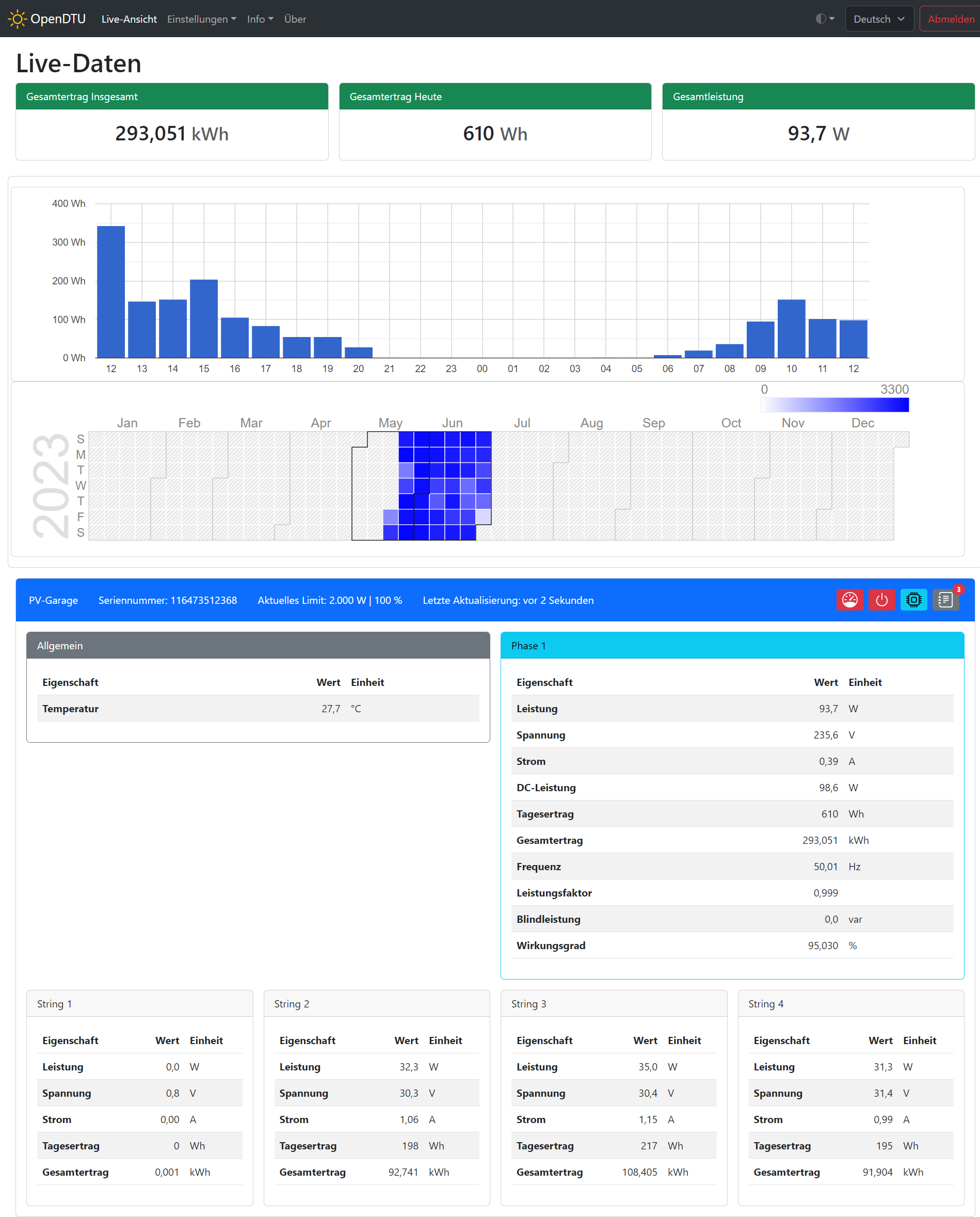
OpenDTU-Database adds an ESP32 LittleFS Database and two energy charts, a column chart of the last 25 hours and a full calendar chart.

OpenDTU-Database adds an ESP32 LittleFS Database and two energy charts, a column chart of the last 25 hours and a full calendar chart.
There are 3 new APIs available, returning JSON strings:
| API | returned values |
|---|---|
| /api/database | returns all recored data points from the database with total energy value |
| /api/databaseHour | returns the energy per hour for the last 25 hours |
| /api/databaseDay | returns the energy for each day |
Each data point has the following format: [ year (00-99), month (1-12), day (1-31), hour (0-23), energy (Wh) ]
Example: [23,6,30,15,132.995605]
The 192KB LittleFS in OpenDTU can store around 6 years of data, because each data point needs only 8 bytes of memory.
Background
This project was started from this discussion (Mikrocontroller.net). It was the goal to replace the original Hoymiles DTU (Telemetry Gateway) with their cloud access. With a lot of reverse engineering the Hoymiles protocol was decrypted and analyzed.
Documentation
The documentation can be found here. Please feel free to support and create a PR in this repository to make the documentation even better.
Breaking changes
Generated using: git log --date=short --pretty=format:"* %h%x09%ad%x09%s" | grep BREAKING
* 71d1b3b       2023-11-07      BREAKING CHANGE: Home Assistant Auto Discovery to new naming scheme
* 04f62e0       2023-04-20      BREAKING CHANGE: Web API Endpoint /api/eventlog/status no nested serial object
* 59f43a8       2023-04-17      BREAKING CHANGE: Web API Endpoint /api/devinfo/status requires GET parameter inv=
* 318136d       2023-03-15      BREAKING CHANGE: Updated partition table: Make sure you have a configuration backup and completly reflash the device!
* 3b7aef6       2023-02-13      BREAKING CHANGE: Web API!
* d4c838a       2023-02-06      BREAKING CHANGE: Prometheus API!
* daf847e       2022-11-14      BREAKING CHANGE: Removed deprecated config parsing method
* 69b675b       2022-11-01      BREAKING CHANGE: Structure WebAPI /api/livedata/status changed
* 27ed4e3       2022-10-31      BREAKING: Change power factor from percent value to value between 0 and 1
Currently supported Inverters
| Model | Required RF Module | DC Inputs | MPP-Tracker | AC Phases |
|---|---|---|---|---|
| Hoymiles HM-300-1T | NRF24L01+ | 1 | 1 | 1 |
| Hoymiles HM-350-1T | NRF24L01+ | 1 | 1 | 1 |
| Hoymiles HM-400-1T | NRF24L01+ | 1 | 1 | 1 |
| Hoymiles HM-600-2T | NRF24L01+ | 2 | 2 | 1 |
| Hoymiles HM-700-2T | NRF24L01+ | 2 | 2 | 1 |
| Hoymiles HM-800-2T | NRF24L01+ | 2 | 2 | 1 |
| Hoymiles HM-1000-4T | NRF24L01+ | 4 | 2 | 1 |
| Hoymiles HM-1200-4T | NRF24L01+ | 4 | 2 | 1 |
| Hoymiles HM-1500-4T | NRF24L01+ | 4 | 2 | 1 |
| Hoymiles HMS-300-1T | CMT2300A | 1 | 1 | 1 |
| Hoymiles HMS-350-1T | CMT2300A | 1 | 1 | 1 |
| Hoymiles HMS-400-1T | CMT2300A | 1 | 1 | 1 |
| Hoymiles HMS-450-1T | CMT2300A | 1 | 1 | 1 |
| Hoymiles HMS-500-1T | CMT2300A | 1 | 1 | 1 |
| Hoymiles HMS-600-2T | CMT2300A | 2 | 2 | 1 |
| Hoymiles HMS-700-2T | CMT2300A | 2 | 2 | 1 |
| Hoymiles HMS-800-2T | CMT2300A | 2 | 2 | 1 |
| Hoymiles HMS-900-2T | CMT2300A | 2 | 2 | 1 |
| Hoymiles HMS-1000-2T | CMT2300A | 2 | 2 | 1 |
| Hoymiles HMS-1600-4T | CMT2300A | 4 | 4 | 1 |
| Hoymiles HMS-1800-4T | CMT2300A | 4 | 4 | 1 |
| Hoymiles HMS-2000-4T | CMT2300A | 4 | 4 | 1 |
| Hoymiles HMT-1600-4T | CMT2300A | 4 | 2 | 3 |
| Hoymiles HMT-1800-4T | CMT2300A | 4 | 2 | 3 |
| Hoymiles HMT-2000-4T | CMT2300A | 4 | 2 | 3 |
| Hoymiles HMT-1800-6T | CMT2300A | 6 | 3 | 3 |
| Hoymiles HMT-2250-6T | CMT2300A | 6 | 3 | 3 |
| Solenso SOL-H350 | NRF24L01+ | 1 | 1 | 1 |
| Solenso SOL-H400 | NRF24L01+ | 1 | 1 | 1 |
| Solenso SOL-H800 | NRF24L01+ | 2 | 2 | 1 |
| TSUN TSOL-M350 | NRF24L01+ | 1 | 1 | 1 |
| TSUN TSOL-M800 | NRF24L01+ | 2 | 2 | 1 |
| TSUN TSOL-M1600 | NRF24L01+ | 4 | 2 | 1 |
Hardware you need
ESP32 board
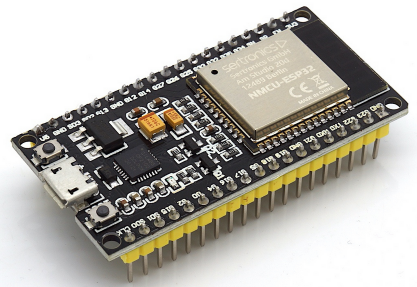
For ease of use, buy a "ESP32 DEVKIT DOIT" or "ESP32 NodeMCU Development Board" with an ESP32-S3 or ESP-WROOM-32 chipset on it.
Sample Picture:
Also supported: Board with Ethernet-Connector and Power-over-Ethernet Olimex ESP32-POE
Change pin assignment
Its possible to change all the pins of the NRF24L01+ module, the Display, the LED etc. The recommend way to change the pin assignment is by creating a custom device profile. It is also possible to create a custom environment and compile the source yourself. This can be achieved by copying one of the [env:....] sections from 'platformio.ini' to 'platformio_override.ini' and editing the 'platformio_override.ini' file and add/change one or more of the following lines to the 'build_flags' parameter:
-DHOYMILES_PIN_MISO=19
-DHOYMILES_PIN_MOSI=23
-DHOYMILES_PIN_SCLK=18
-DHOYMILES_PIN_IRQ=16
-DHOYMILES_PIN_CE=4
-DHOYMILES_PIN_CS=5
It is recommended to make all changes only in the 'platformio_override.ini', this is your personal copy.